After the latest redesign of my website using Wordpress' content management capabilities, I've let my thoughts percolate for awhile on my final impression of its effectiveness and usefulness for artists. So far, my impressions haven't changed much from the original Pros & Cons listing that I did previously. Here are a few thoughts that might help you come to a decision of whether you want to use it or not.
The Trouble With Wordpress...
...is that it's definitely not for beginners, as far as online management of content. You must know how to install a database, backup a database, and upload files. If you have a Geek on call that can help you with all this, than all the better! I learned how to do this all myself and it's technically not that hard once you get the hang of it. Get yourself a good FTP program (I use Filezilla) and play around in your website's control panel until you're familiar with it. I killed my own website a few times before I finally learned how to make a backup properly. Luckily, Wordpress is insanely easy to get running again! I restored my site to basic functionality from scratch in just a day after nuking it.
Taking Risks with Plugins & Upgrades
Another issue of concern for me is that plugins are always being upgraded and sometimes they might be borked in the upgrading. There is a dialog menu that pops up before you download and install a plugin that tells you whether or not it has been tested with your version of Wordpress. Pay attention to this because it could spell disaster if you haven't backed up your site recently! Plugins and upgrades to the core of Wordpress are a calculated risk in my opinion. I'd much rather deal with that than going back to my old way of doing things (Photoshop, html, and building everything by hand). The Wordpress community also seems very tightly knit and there's always an ear out for troubleshooting, if you post your concerns on a plugin's webpage.
Code Makes My Brain Hurt
I did end up grating my brain a little over certain CSS programming that was required to make my website look the way I want, but generally I found that for everything I wanted to tweak, there was an online tutorial showing me how to do it. Be careful with following tutorials, however, as sometimes they might be for older versions! (I found this out the hard way when I nuked my site following a database backup tutorial). Pay attention to the date of the tutorial and try to find the most recent ones.
Easy to Use Gallery Functionality
Updating my galleries has never been easier with the NextGEN Wordpress plugin (you just upload, tag descriptions, and go!). It's saved me so much time with my website's upkeep, particularly where galleries are involved, and also provides a sleek looking slideshow integrated with its interface. This is definitely one of the strongest reasons I've decided to bank on Wordpress for my needs as an artist.
E-Commerce Capabilities
I've managed to get a shop running with the e-commerce plugin by Instinct (will review this in a later post). It's not the prettiest shop, but it is free (unless you want to pay to upgrade to a prettier interface with additional payment gateways). I had some bugs during setup, but have managed to get it working to allow me to accept Paypal. As an admin, you can also print packing slips and keep track of orders all in one place. Another randomly useful feature is the ability to make a product link offsite if you have it listed elsewhere. For example, I have many of my products set up so that they link to their Etsy listings instead when you click them.
It's not perfect, but it will serve my purposes till I can afford the premium plugin at $200 for a commercial license for a multiple person business. It's only $40 if you have a single employee. Considering how much I've paid in the past to upkeep an Amazon Webstore ($60 a month) or an eBay shop (approx. $20 a month), this one-time fee is a small price to pay.
All in All...
If you can handle the learning curve and don't self-destruct at the thought of a little coding, than I recommend Wordpress. It's not perfect, but it's certainly functional and easy to manage right out of the proverbial box.

Reviews of art products and suppliers. Provider of photo references and art marketing advice for artists. Created by an artist for other artists!
Showing posts sorted by relevance for query wordpress. Sort by date Show all posts
Showing posts sorted by relevance for query wordpress. Sort by date Show all posts
Wednesday, April 28, 2010

Thursday, September 18, 2014
Wordpress & Artists: My Favorite Plugins and Themes

EDIT: I've updated this list on 2/17/2017!
A couple of years back, I did a series of posts on Wordpress and its value as a CMS (content management system) for artists wishing to create their own websites. I am still using Wordpress to manage my site to this day and thought I'd share a few of my favorite plugins and themes!
Plugins
All In One SEO Pack - Lets you add custom tags and meta info to your pages very easily to make it more easily found by search engines.
Duplicator - Lets you copy your site and database so you can move your entire site from one location to another. Handy if you've been building in a private test folder before moving it onto your main domain. This plugin can also create a snapshot of your site at any time for backup purposes.
The Events Calendar - Great for adding your upcoming appearances into a calendar on your Sidebar.
Jetpack - This plugin combines a full suite of features for your Wordpress site, which I like to use the features that allow you to link to thumbnails of related posts, show my site stats in my Admin dash, and publicize each blog post to my favorite social networks. The rest I don't use.
MailChimp by MailChimp and Crowd Favorite - Lets you add a widget with a customizable MailChimp sign up form into your site's Sidebar.
NextGen Gallery by Photocrati - A wonderful gallery management tool that lets you create taggable images with sleek layouts. The pro version nets you extra layouts and social sharing links bundled in. If you decide on the pro version, give me al ittle kickback by using my referral link!
WooCommerce - In the few years since I've originally tried this plugin, it's been much improved and stabilized. Stripe and Paypal integration come right out of the box and it provides a sleek, professional looking shop. The new shipping classes are much improved and easier to understand than they were a couple of years ago as well!
WP Hide Post - I use this plugin to hide Pages and/or Posts from my site's search and navigation function. This is handy when you're linking people (ie. Patreon Patrons) to exclusive content.
WP-Spamshield - I get an insane amount of spam on my Wordpress based blog and this plugin helped me keep most of the bots out. When it had conflicts with another plugin (namely that troublemaker NextGen), the creator of the plugin was friendly and responsive to help me sort out the problems and even helped me to make my site run faster. The conflicts have since been resolved as of this writing and this plugin continues to be my site's spam blocking warrior.
Themes
All of the themes mentioned here are mobile phone friendly.Make - What I'm currently using on my latest site. Make comes with a free version you can use as-is. I love the integrated social icons bar (I was hard coding them all before into a Sidebar widget) and it's very sleek looking. The packaged Builder templates for creating Pages on your site allows you to do Pages with columns, image sliders, galleries, etc. very easily without requiring a lot of coding knowledge. It is e-commerce ready with WooCommerce integration in mind.
The Pro version lets you get rid of the template tag on the bottom as well as opens up extra Page layouts and pre-made templates where you can toggle Sidebars on and off and auto-populate Pages based on their intended use for quick Page building. You also get access to more type kits that let you change the font style of your whole website at once.
The free and pro versions both have a ton of customizable Widget areas such as multiple Footers and Menu locations. Buying the Pro version also lets me use this theme on all of the sites I own.
Virtue - Has a free and pro version. The free version lets you create grids using Portfolio items. I almost went with this one for my site, but I found the Portfolio setup a little confusing. If you can manage it though, it seems like a pretty versatile theme. Just like Make, you get tons of customizable Widget areas, such as multiple Footers and Menu locations. It is also e-commerce ready with WooCommerce integration in mind.
Wave - I never got to test this one out on my own, but the demo site looks good and it's also e-commerce ready. I'm including it here as an option because it was reviewed highly, is a decent price, and might be an option others might want to try.
So what are some of your favorite plugins and themes? Share in comments!
Sunday, April 4, 2010
Wordpress & Artists: A First Impression
Have any of you ever wished you had your own personal Geek on call to fix your website? (I know I do!)
An important part of my business as a fantasy artist is my website where I can keep in touch with my fans and friends. From there, people are guided to information about me, sections of my stores on Amazon and Etsy, my social media profiles, and to all manner of odds and ends. Maintaining my website, however, is never an easy task for me with my archaic method of using html tables and images.
It takes weeks at a time to alter the navigation, update the galleries, or add new content. My info is scattered across a forum, 3rd party sites, and various sections with broad organization that requires a lot of click-throughs. In short, my website is a bloody mess to update because I have to do everything by hand.
I build the thumbnails, large and small, every time I want to update my gallery. I build my menu navigation from scratch in Photoshop. When I want to add news, I have to do it by typing in text on the news page and then having to redo all the RSS coding for that page. I dream constantly of a CMS (Content Management System, a type of database powered program that is useful for designing websites) built especially for artists that bares in mind our need for easy gallery updating, dynamic content, and a smooth customizable look.
It may not be specifically for artists, but I've recently stumbled upon Wordpress, a free CMS I've been investigating lately to solve my website woes. Last week, I finished a 24 hour trainer book (in about 3 days at my absorption rate) which really opened my eyes to how much having a php/css powered website can help me manage my website better!
I've only just started playing with it and here are my first impressions:
So far, it seems like Wordpress is going to do everything that I want it to do to help me keep my website updated! Expect a full report once I've had more time to play with all its bells and whistles.
An important part of my business as a fantasy artist is my website where I can keep in touch with my fans and friends. From there, people are guided to information about me, sections of my stores on Amazon and Etsy, my social media profiles, and to all manner of odds and ends. Maintaining my website, however, is never an easy task for me with my archaic method of using html tables and images.
It takes weeks at a time to alter the navigation, update the galleries, or add new content. My info is scattered across a forum, 3rd party sites, and various sections with broad organization that requires a lot of click-throughs. In short, my website is a bloody mess to update because I have to do everything by hand.
I build the thumbnails, large and small, every time I want to update my gallery. I build my menu navigation from scratch in Photoshop. When I want to add news, I have to do it by typing in text on the news page and then having to redo all the RSS coding for that page. I dream constantly of a CMS (Content Management System, a type of database powered program that is useful for designing websites) built especially for artists that bares in mind our need for easy gallery updating, dynamic content, and a smooth customizable look.
It may not be specifically for artists, but I've recently stumbled upon Wordpress, a free CMS I've been investigating lately to solve my website woes. Last week, I finished a 24 hour trainer book (in about 3 days at my absorption rate) which really opened my eyes to how much having a php/css powered website can help me manage my website better!
I've only just started playing with it and here are my first impressions:
| The Pros | The Cons |
| Super easy to create image galleries by default (or with handy dandy plugins like NexGEN) | A moderate learning curve. |
| Ability to import blogs and comments, including Blogger, and most major blogging services. | Some CSS code knowledge required (but none I couldn't find tutorials for online so far) |
| Tons of plugins, including ones for forums, easy form builders, social media integration, automatic metatagging, and shopping carts! | Updates to Wordpress may cause some plugins or themes to go wonky. |
| Visual interface that's fairly self-explanatory | |
| Tons of free themes that you can customize for your own look. | |
| Ability to make individual posts or pages private or password protected (IE. Good for giving special subscribers sneak peeks, perhaps?) | |
| Multiple admins and co-admin users allowed (IE. Handy if you have have a studio with multiple people) | |
| Ability to integrate your forum, blog, and website together so people won't have to register a username at all of them separately. | |
| Page editor allows html or rich-text editing (super handy for seeing how your pages look and giving ultimate control over your code) |
So far, it seems like Wordpress is going to do everything that I want it to do to help me keep my website updated! Expect a full report once I've had more time to play with all its bells and whistles.
Monday, November 30, 2015
Patreon Project Kit for Artists

EDIT: Patreon has started a referral program! So if you'd like to give it a try, feel free to use my referral link - https://patreon.com/invite/gpvq
I'm a firm believer that crowd-funding is the wave of the future and the core building block of a growing breed of artist-entrepreneurs. As soon as Patreon launched back in 2013, I knew they'd be something special for the creative community! Through this format, people have been able to share more directly than ever before.
I thought I'd join in that spirit of giving by sharing the structure, templates, and other resources that keep my Patreon ticking! I hope it helps other artists out there considering promoting their projects via this site. Let's make a Patreon!
Release Schedule
When you set up your account, it's important to have an idea of how and when your releases will occur and also other notices you'd like to send to your Patrons so you can be aware of how much you might be spamming them at once so they don't get fatigued by your posts. Mine go something like this:
- Last Day of the Month. Patreon begins charging your Patrons on the 1st of the month, so let's start there! The monthly image is uploaded before or on the last day of the month. I only release one painting per month to keep things simple, but you may want to release more frequently!
EDIT 11/20/2025: I eventually moved to charging once per month for any updates rather than Per Creation, as this way Patrons won't be surprised by any charges if I happened to be especially productive in any given month. Patrons gave me feedback that this was easier for them to budget.
- Within the First Week of the Month. Rewards for all levels are posted in individual posts (one for each tier) and a PM is sent out regarding my Keyword Inspiration sketch (an event I hold monthly for $5+ Patrons where they turn in prompts and I draw the most inspiring prompt). (You can also use Patreon's Shop area to host rewards, as you can make shop items free for individual tiers.)
- The 15th of Every Month. A mid-month reminder post reminding people to attend my monthly Studio Hangout (with a link to the Event on Google+), sharing a WiP of that month's art, and any other important reminders that might be relevant. The 15th is also my internal deadline to have the physical Rewards mailed out. (EDIT: I have since moved to letting Patreon Merch fulfill on my behalf and this has made my life easier! Very much worth the extra cost of the program.)
- Last Wednesday of Every Month. A link to the recording of my live Studio Hangout is posted to Patreon. The recording is auto-generated by Hangouts and posted to YouTube for me, which makes things easy.
(EDIT 11/20/2025: Lately, I use Twitch to broadcast hangouts and take recordings with Streamlabs.)
- Last Day of the Month. Patreon begins charging your Patrons on the 1st of the month, so let's start there! The monthly image is uploaded before or on the last day of the month. I only release one painting per month to keep things simple, but you may want to release more frequently!
EDIT 11/20/2025: I eventually moved to charging once per month for any updates rather than Per Creation, as this way Patrons won't be surprised by any charges if I happened to be especially productive in any given month. Patrons gave me feedback that this was easier for them to budget.
- Within the First Week of the Month. Rewards for all levels are posted in individual posts (one for each tier) and a PM is sent out regarding my Keyword Inspiration sketch (an event I hold monthly for $5+ Patrons where they turn in prompts and I draw the most inspiring prompt). (You can also use Patreon's Shop area to host rewards, as you can make shop items free for individual tiers.)
- The 15th of Every Month. A mid-month reminder post reminding people to attend my monthly Studio Hangout (with a link to the Event on Google+), sharing a WiP of that month's art, and any other important reminders that might be relevant. The 15th is also my internal deadline to have the physical Rewards mailed out. (EDIT: I have since moved to letting Patreon Merch fulfill on my behalf and this has made my life easier! Very much worth the extra cost of the program.)
(EDIT 11/20/2025: Lately, I use Twitch to broadcast hangouts and take recordings with Streamlabs.)
Digital File Rewards
Digital Rewards are the cornerstone of any Patreon since they're easy to fulfill and require less of an expense on the artist's part. Here are a few ideas for distributing digital items.
- EDIT 11/20/2025 Patreon's Shop. Patreon natively hosts shop listings now which you can offer free to specific tiers, making it great storage for digital rewards.
- Patreon File Attachments. Now that Patreon supports post tags, Rewards are easy to find and autotagged by the cost of the Rewards level without you needing to lift a finger. You could also create tags with custom Rewards names, if you've personalized your tier titles. Be aware that a single post can support unlimited attachments as long as each attachment is not larger than 200MB.
- Gumroad. Gumroad is a free online shop service that allows a user to create shop listings and host digital files of up to 16GB per attachment. They allow users to create private listings, which is perfect for sharing Patreon exclusive files. You can also share files that would usually cost money by creating a special offer code and sharing links where the code is auto-applied to your listing only with your Patreon Patrons. Best of all, Gumroad takes care of the file hosting and link management for your Patrons! You can find out more about using Gumroad the way that I am suggesting here and here (the 2nd method discussed on the help entry about creating an offer to make a product free is the one I'm referring to).
- DeviantART's Sta.sh. DA's sta.sh allows for private viewing of file links for anonymous viewers who have the url. You can store any kind of file (image, video, etc.) and also 'stack' them if you have multiple releases you'd like to show at a single url. The current default limit for free users of DA is 2GB while Premium members get 10GB. Another random perk is that you can also hotlink to sta.sh files if you are embedding images into html on other sites.
- YouTube. YouTube allows you to upload videos at private links (called 'unlisted videos') that are only accessible to those who have the link. It's a good alternative if you want to offer a streaming option for videos instead of requiring a complete download of the entire file.
- YouTube. YouTube allows you to upload videos at private links (called 'unlisted videos') that are only accessible to those who have the link. It's a good alternative if you want to offer a streaming option for videos instead of requiring a complete download of the entire file.
Private Journal Entries
Sharing exclusive posts can really make Patrons feel special! However, Patreon's current journal function is very limited and doesn't allow images and text to be formatted easily. For this reason, here are some suggestions for ways to share private journals:
- WP Hide Post. If you run a site built with Wordpress, the WP Hide Post plugin allows you to completely hide a post from search engines, your website's categorization, etc. so that you can essentially host a private post on your server that you can link people to. Only those with the direct link can see it or find it.
- WP Hide Post. If you run a site built with Wordpress, the WP Hide Post plugin allows you to completely hide a post from search engines, your website's categorization, etc. so that you can essentially host a private post on your server that you can link people to. Only those with the direct link can see it or find it.
- DeviantART's Sta.sh. While also useful for storing files, you can also use Sta.sh Writer to create more robust journal entries than Patreon currently does that can be linked to directly, but not accessed publicly. These private journals also allow DeviantART users to comment on them.
- EDIT: 5/17/2023 Patreon's Wordpress Plugin. This plugin for Wordpress will let you lock posts behind a paywall organized by your Patreon's tiers on your Wordpress site so that you can encourage promotion natively from your own website. You can see this in action on my website here.
Physical Rewards
- Postcard and Greeting Card Mailings. I use www.postable.com for a fast, secure, and easy solution for mailing out postcards (ie. Christmas cards, Thank You cards, etc.) to my Patrons. You can personalize your cards online, though they will not be handwritten.
- Prints. I usually print off my own prints via an Epson Artisan 1430 which boasts lightfast inks and wide format printing (up to 13x19 inches), but when I need bigger and/or fancier prints (ie. giclee, canvas, mounted prints, etc.), I turn to www.iprintfromhome.com (tell them Angela Sasser sent you and we both get Thank You dollars when you make your first order!).
- EDIT: 5/17/2023 Patreon Merch. I've recently joined the Merch program to test it out and I'm very excited! I know the quality will be good, as they have integrated with Printful, which I already use in my shop for drop-shipping. This program promises to save me time by managing all my merch packaging, delivery, and loyalty tracking needs. Once I have tried this program for awhile, I'll be sure to share a full review here.
Reader Suggestions
Before I get to the Templates, I'd love to hear your reader suggestions in comments!
If you have any tips or resources you'd like to add that I find particularly helpful,
I'll add your tip to this journal entry with a link to your Patreon page.
Let's make this entry a great resource for the community!
If you have any tips or resources you'd like to add that I find particularly helpful,
I'll add your tip to this journal entry with a link to your Patreon page.
Let's make this entry a great resource for the community!
Templates
Patreon has an official set of logos, wordmarks, and swatches you can find here! They have specific rules of how they prefer their logos to be used, so it's definitely worth checking out this page.
Saturday, July 5, 2014
Using a Mailing List to Promote Your Art

Now that I've returned to conventions, I've been sharpening my marketing strategies and trying to figure out more efficient ways to keep in touch with my fanbase as a freelance artist.
While I do hope to work with more studios and publishers in the future, it's useful for me to nurture my independent career by also nurturing my direct relationship with my fans as well. After all, I have a lot of personal projects that I do for no one else but myself and the fans that offer me opportunities under my control instead of at the whims of another entity.
Benefits of a Mailing List
For one, I've realized that the advantage of a mailing list is that while not everyone is on every social media outlet ever, most everyone has an e-mail. Even if my newsletter gets put in the Trash, it's still a central method at which I can communicate directly with everyone without relying on the sporadic shotgun method of hitting all of the social networks and hoping someone sees it.
This is especially relevant in an age where our posts are getting lost to social network feeds that now require small businesses to pay to even be seen (ie. the recent neutering of the reach of unpaid posts on Facebook Fan Pages).
What to Use
I personally use Mailchimp, which is free to use up until you hit 2,000 subscribers and 12,000 emails a month. After which, I'd be happy to pay, considering the usefulness of this service!
Essential Setup of Your Mailing List
After setting up your mailing list, these are the two essential parts of your list that you need to set up as well.
The Signup Form
Check out my signup form to see an example of one in action! You can also see the Wordpress signup Widget in action on my website.
The Autoresponder
An autoresponder is also linked to your unique list and is the automatic e-mail which is sent out after a subscriber signs up for your list. Mailchimp has a default one, but it's wise to customize this e-mail to your business to make a more personal connection with your fans. I use my autoresponder to inform my new fans about what kind of updates they can expect from me, provide quick links to my social networks, and pitch my Patreon page in an unobtrusive way.
The autoresponder is also a great way to reward your new fans and make them feel special! For instance, I offer a link in my autoresponder to a free gift of a coloring book that would usually be a paid item. Other ideas for shareable promo items could be downloads of your art as wallpapers or a discount code to your shop.
Here's a screenshot of my autoresponder (or you can see it in live action by signing up for my list, if you like!)
 |
| Click to enlarge. |
Segments & Groups
EDIT 8-25-2012 I've discovered the use of Segments and Groups within Mailchimp and added this section. They're quite invaluable to a tidy list!
Utilizing Groups within your mailing list's subscribers means you can have a Sign Up form with checkboxes detailing what kinds of updates the person would like to receive (aka. the Groups that you can make dictate the kinds of updates) while also cutting down the number of lists you have and redundant signups.
I made a Group and corresponding list Segment in my mailing list for people who might be interested in following my Ladies of the Months series outside of Kickstarter to test this out.
You can see the checkboxes/Groups in action here.
You'll have to remember to update your Automation/Autoresponder to respond to the individual list segment/Group too!
For the full technical instructions for this process, check out Mailchimp's documentation on the subject.
Promoting Your List
So now that you have a list, don't forget that it exists! Here are some ideas to gain new subscribers.
- Etsy Shop - Include a link to your singup form in your shop announcement and in your automatic sale letters so your customers can remember to keep up with you. (The same goes for your social network links!)
- Giveaways at Conventions - Host an exclusive giveaway at conventions to entice people to sign up for your mailing list. Doing this also encourages people to come back to visit against, which provides an extra opportunity for them to be tempted by your shinies.
- Monthly Giveaways for List Members - I already do exclusive monthly giveaways for my Patreon patrons, but I have seen other artists encourage signups on their mailing lists by offering exclusive giveaways only for those on their mailing lists. This makes your fans feel extra special!
Maintaining a Newsletter Schedule
One of my biggest mistakes was to overshoot my goal and try to keep a really active newsletter. Create a schedule for yourself that you know you can maintain!
For instance, I used to do a mailing list every month, but the fact is because I work so slowly, I didn't have a lot to share each month. In the end, it was easier for me to do a quarterly (once every 3 months) newsletter instead.
It's also smart to keep your newsletter text short and sweet! Big chunks of text do okay in journal entries, but people have very short attention spans for e-mails. Keep your text relevant and to the point!
I hope this info helps some of you out there who might be struggling with how to communicate with your fanbase or who were just not sure what to do with a mailing list in the first place.
If you have any tips for mailing lists I didn't mention, please do share in comments. Good luck, everyone!
Wednesday, August 17, 2022
Review - Emily Jeffords' Making Art Work 2021

It's been a wild ride navigating the waters of COVID and my evolving career as an artist for the past 2 (going on 3) years. 2020 was a rough year for many artists who relied on convention income, including myself. The crushing pressure of this situation made it more evident to me as an artist that I needed to get my online marketing game up!
After 2020, I desperately wanted more direction for how I could organize my scattered business and become more regimented about my online marketing practices. Rather than go for a personalized mentorship, I opted for something I felt was more affordable for my budget, but still covered my needs for fundamental and advanced marketing info - Emily Jeffords' art marketing class, Making Art Work.
Making Art Work aims to educate artists on the fundamentals of marketing, while encouraging them to plan for their success and sustainability. This class is self-directed with live Q&A sessions held weekly to supplement each module.
This review only covers my experience as a 2021 student, so keep that in mind for the purposes of this review, as things may change in future courses.
Disclaimer: This is not a paid review and was written without any incentives being offered to me.
The TL;DR
Emily Jeffords' Making Art Work offers an info-packed review of the basics of marketing primarily geared towards fine artists, with actionable advice, introductions to various income streams through guest experts, and suggested paths for building future marketing strategies. This class relies on Facebook, which may cut non-FB users out unless they're willing to join up to the platform.
If you are hoping to learn more about licensing, wholesale, etc. this course only scratches the surface of these topics so you may want to seek further education from individual courses dedicated to these topics. Aside from a few inefficient apps used for extracurricular communication, the class material presented through Kajabi was easy to follow and allows for tracking of your progress.
For more advanced entrepreneurs, this course offers a great review of the fundamentals with actionable strategies for assessing your business and best practices for planning for the future.
Things to Know:
- Cost: $1000 (after an email coupon) + Approx. $30 for the peer group add-on
- How Long is this Course? 12 weeks
- Apps Utilized: Telegram, Voxer, Facebook, Zoom
- Access to modules is not forever, but only for 2 years after sign-up. A method to mass download all of the module worksheets was made available at the end of the course.
- Class was previously held annually and seems to have changed to an every other year schedule
Who is this class for?
This class is mainly aimed at creative entrepreneurs who wish to sell their work through galleries, wholesale, merch, licensing, their own educational material, and other avenues. While I am not primarily a Fine Artist, I still found the material relevant for assessing strategies for my own art biz, which currently focuses on independently selling my illustrative merch directly to my fans and through crowdfunding.
Emily's course very much also takes the approach that an artist should be striving for sustainability through diversification, rather than killing themselves to focus solely on the sales of paintings. So if you're looking primarily for instruction on working directly with galleries, for example, a more in-depth course on building relationships with galleries may be more to your liking. However, if you're seeking a breakdown of the basics and strategies for diversification and refining your marketing techniques, this class has you covered and does cover the basics of licensing, wholesale, gallery sales, etc by bringing in guest experts for each topic for short introductory segments.
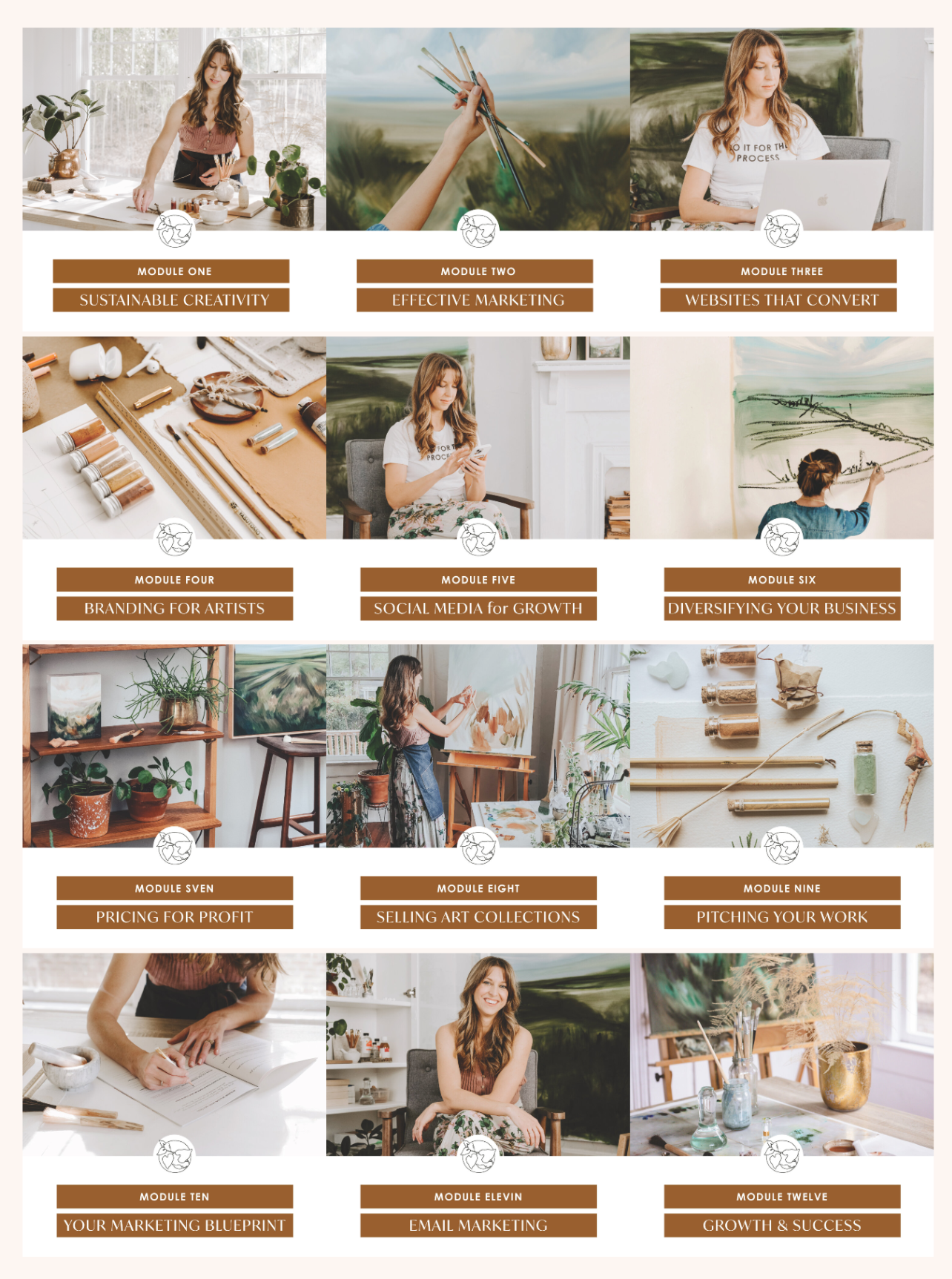 |
| A glimpse at what the Making Art Work modules were in 2021. The mix of basic & advanced marketing techniques sold me on this class. I needed a refresher, as well as guidance for how to evolve! |
Thursday, March 12, 2009
eBay Shop Review

Back in 2001 or so, I got wind of eBay shops, tried it for a little while, and then gave up when it didn't seem like I was getting many bites at all. At that stage in my development, I chocked it up to not having enough quality inventory nor much presence on the internet in general. The fees proved too much and I was simply not selling enough to cover the $15 a month bill.
8 years later I decided to try eBay shops again in December of last year. I had built up a decent inventory of art since my first try and had several communities and websites to my name to promote the shop at. eBay shops had improved much in my absence, such as a greater ability to organize your inventory, greater search engine compatibility, cross promotion capabilities, and the integration of Store search results with eBay's main search page (which was one of its main failings previously). Another handy feature is the ability to export sales reports and integrate the eBay shop with organizational software. There are definitely a few more bells and whistles than it had during its infancy.
In the three months I've used it, I've gotten a few inquiries on items, but never sales. I tried customizing my options with the Bold higlighting as well as the international listing option which allows my items to be seen by eBayers in the UK. I got plenty of views, but still no bites even with proper cross-promotion from my other websites. Meanwhile, the wracked up fees from listing my inventory and auctions plus the $15 for maintaining the shop produced a $30 drain per month rather than merely a $15. Add onto that the 12% commission eBay would take out of my final sales and you have a store that eats profits rather than creates them.
The Bottom Line: eBay shops seems best suited for those of you who may be able to move items faster (ie. if you sell collectible items, cosplay, or other in-demand things), therefore making the monthly drain not so detrimental. The interface is customizable with lots of features, but the majority of your pageviews come from active Auctions and not standing inventory (at least in my experience with Shops).
From my time with eBay Shops, it seems to me that to make a shop work successfully, you must keep both a regiment of active auctions and an in-demand inventory, something which is hard to do if your inventory is in less of a demand and you are not producing work for auction monthly. It is a good alternative if you can move items quickly and don't want to deal with the headache of programming inventory pages yourself, but not recommended for those with slower high priced luxury inventory like fine art unless your name just has that much demand behind it and you have the budget to support the shop.
For now, I've decided to focus on revamping my website store with the free shopping cart Mal-E, which integrates Paypal, Google Checkout, and other useful payment methods so that my website becomes the one stop shop for personalized items rather than eBay. (EDIT 1-21-2015: I have since moved my site onto a Wordpress CMS and am using the WooCommerce plugin, which has been a great free e-commerce solution thus far!)
I still plan to post eBay auctions at random per month to give people a chance at acquiring originals and commissions for less and to draw traffic to my website store, but my shop on eBay is closing indefinitely this time unless their fees decrease and their benefits increase.
I welcome any comments from those of you who have eBay shops that are actually operating at a profit. Please share your stories and advice!
Till next time, keep your creative spirit strong!
Subscribe to:
Posts (Atom)