Thursday, December 15, 2022

Resources for Artists Against Unethical AI Development


Who knew that 2022 would be the year artists would be having the discussion of whether or not they would be replaced by Artificial Intelligence?  But here we are in a very normal looking dystopian future!  Rather than re-hash what other more eloquent folks who have already stated, I wanted to put together this article to gather educational resources and advocacy efforts that I hope will be helpful to the art community.  I'll try to keep it updated as and when I can.  Feel free to suggest more resources in the comments!

Image Source: Pixabay
TL;DR for the folks who don't already know.  AI image generators like Stable Diffusion, MidJourney, Dall-E, and others have trained their technology on data that has been scraped from copyrighted sources without the permission of the owners of those images, including not only artists, but even the medical records of unwitting individuals as well.  To make matter worse, this tech was irresponsibly proliferated via Open Source code before regulation was even considered for its potential for copyright abuse.

We should not promote and condone any positive uses of this tech until the unethical side of it is regulated first, no matter what its helpful potential might be.  It is too harmful to the rights of creators and the creative field, in general, until regulation occurs.  Whether ethical or not, this tech was created to replace the need for artists and that will change how art and professional industries evolve over the next few years, for better or for worse.

And now on to the resource links!


For General Education

  • The Unethical Origins of AI - A thorough and well-researched thread on the unethical elements of AI generation with a breakdown of common defenses of the tech and accompanying explanations.  Complete with links to further research. (Facebook mirror link of this thread in case Twitter goes down).

  • Why AI Models are not inspired like humans. - An article by Karla Ortiz, a respected artist in the entertainment and illustration industry who has done her homework on this tech and also links to outside experts in the field.  This article explains an important distinction between how artists and machines learn, a common defense in letting AI tech go unchecked.

  • Invasive Diffusion: How one unwilling illustrator found herself turned into an AI model - An article discussing how an artist was targeted for her popular style and a model built on her art, which was then released for Open Source use, causing direct harm to the artist's livelihood and brand recognition.  It also discusses the potential for fraud and security issues with AI's power to simulate convincing photos of anyone after training on just a handful of photos of one's face.

  • The Future of AI Art and Automation in Creative Industries (Added 2/23/2023) - Written by prolific commercial photographer, Jingna Zhang, this article discusses the current and future uses of AI in the creative industries, what trends we can expect in job losses, and more considering this comes from someone extremely active in many branches of the creative community.  Zhang is also the founder of Cara.app, an ArtStation replacement that is committed to ethical use of AI.
  • Opinion: Is the use of AI worth it? (Added 9/4/2025) - A discussion from a professional within the art and IT fields discussing the harmful effects of AI beyond the creative industry with sourced research for further reading.

Okay that was a lot so let's take a break with a meme!  Because the humor is keeping me alive right now.

I hate drawing hands too, MidJourney.

Resources for Artists to Protect Their Work

It may seem like a lot of existential doom right now.  Lord knows I've spent a good chunk of my week not sleeping much and pondering what my illustration career is going to look like in the coming years.  But there are some tools in development to help artists keep up with the quick advancement of this technology.

AI generators function off of using training sets (or datasets) which scrape images from everywhere online, including, but not limited to Google, Pinterest, DeviantART, etc.  The following links help you find your work in these training sets, with HaveIBeenTrained also allowing you to opt-out from training sets that respect this organization's wishes.  It's not guaranteed everyone will honor these tools, but it's at least progress that the major developers, like Stable Diffusion, are stepping up to honor the Opt-Out system.

  • HaveIBeenTrained - This site allows users to register for free and opt-out their images from being scraped for AI training.  It's clunky in its current state because you have to opt out images one by one, but it's better than nothing at the moment.  This site was created by Spawning, a group of artists advocating for ethical and consensual development of AI technology.  They are also currently working on Opt-In tools in addition to Opt-Out.

    You can search for your images manually or search by image upload.  The site claims to not store images used for search, which we will just have to trust is true.

  • What is DeviantArt’s new “noai” and “noimageai” meta tag and how to install it - This article discusses the advent of the NOAI meta tag which can be used to tell image scrapers to not use your site and images for training.  Including instructions for how to install it via popular website management tools like Squarespace.

  • Glaze and Nightshade (Added 9/4/205) - Glaze is a tool which adds interference within your image to make it difficult to train on, while Nightshade adds information to your images which intends to disrupt the training tools as a whole.  Both require some computational power to run the filters. Webglaze is a cloud option that is also available if your computer cannot run the app.


What Can We Do?  Advocacy Efforts


Right now, what artists need most to combat the mass proliferation of this technology without any oversight is an organized effort which can navigate the many legal challenges involved with this technology.

EDIT: 2/2/2023 - Class-Action Lawsuit, Artists vs Stability AI et al. - A recent class-action lawsuit filed on 1/13/2023 by Sarah Ander­sen, Kelly McK­er­nan, and Karla Ortiz against Stability AI, DeviantART, and MidJourney which purports that these tools are trained by using copyrighted images, which makes the creation of art via the AI's diffusion methods collages works from the training set, making its output derivative works.  Read more details at the link, as it's an excellent simplified breakdown of how the tech works as quoted directly from its own developers.

EDIT: 2/2/2023 - Getty Images vs Stability AI - Another lawsuit which sprang up a few days after the aforementioned class-action lawsuit.  Getty Images claims that proper licensing was not pursued by AI training sets utilizing their stock images.  Another suit to watch for setting a possible legal precedent.

The Concept Art Association Fundraiser (Fundraiser is closed, but their advocacy page is still up. Updated 9/4/2025) - Thankfully, there is currently a recent effort by the Concept Art Association to hire lobbyists, experts, and more to pursue litigation and advocate for ethical development and coexist with this technology.


The Class Action Lawsuit Against Github, Open AI, and Microsoft - The Verge has a good write-up on a court case currently being filed where several class action litigants are arguing for their rights to their copyrighted material being used for training because it is a violation of Open Source terms.  This case may set a precedent, while also examining the loopholes of training sets hosted and developed by non-profit organizations.

If you know of other advocacy efforts or useful links I should add to this resource list, please leave a comment!  For now, hang in there, friends.  It's rough right now, but there will always be artists and people who appreciate the effort that goes into handmade work.

PLEASE NOTE!  I am not interested in debating the facts about AI in this article, as I stand firmly on the side of the scraping of images without consent being unethical.  The main reason I am sharing this post is to gather resources to help artists.  All comments made here that start pointless debate about the merits of AI will be removed.  This isn't the space for it.

Wednesday, August 17, 2022

Review - Emily Jeffords' Making Art Work 2021


It's been a wild ride navigating the waters of COVID and my evolving career as an artist for the past 2 (going on 3) years.  2020 was a rough year for many artists who relied on convention income, including myself.  The crushing pressure of this situation made it more evident to me as an artist that I needed to get my online marketing game up!

After 2020, I desperately wanted more direction for how I could organize my scattered business and become more regimented about my online marketing practices.  Rather than go for a personalized mentorship, I opted for something I felt was more affordable for my budget, but still covered my needs for fundamental and advanced marketing info - Emily Jeffords' art marketing class, Making Art Work.

Making Art Work aims to educate artists on the fundamentals of marketing, while encouraging them to plan for their success and sustainability.  This class is self-directed with live Q&A sessions held weekly to supplement each module.

This review only covers my experience as a 2021 student, so keep that in mind for the purposes of this review, as things may change in future courses.

Disclaimer: This is not a paid review and was written without any incentives being offered to me.

The TL;DR

Emily Jeffords' Making Art Work offers an info-packed review of the basics of marketing primarily geared towards fine artists, with actionable advice, introductions to various income streams through guest experts, and suggested paths for building future marketing strategies.  This class relies on Facebook, which may cut non-FB users out unless they're willing to join up to the platform.

If you are hoping to learn more about licensing, wholesale, etc. this course only scratches the surface of these topics so you may want to seek further education from individual courses dedicated to these topics.  Aside from a few inefficient apps used for extracurricular communication, the class material presented through Kajabi was easy to follow and allows for tracking of your progress.

For more advanced entrepreneurs, this course offers a great review of the fundamentals with actionable strategies for assessing your business and best practices for planning for the future.


Things to Know:

  • Cost: $1000 (after an email coupon) + Approx. $30 for the peer group add-on
  • How Long is this Course?  12 weeks
  • Apps Utilized: Telegram, Voxer, Facebook, Zoom
  • Access to modules is not forever, but only for 2 years after sign-up.  A method to mass download all of the module worksheets was made available at the end of the course.
  • Class was previously held annually and seems to have changed to an every other year schedule

Free Preview Material: 
Emily offers a free sampling of her teaching methods via a week-long Share the Work event which is usually held shortly before Making Art Work launches, so keep an eye out for it so you can see if you like her methods!  Going through the Share the Work material convinced me to join MAW.  You can read about my experience with Share the Work here.


Who is this class for?

This class is mainly aimed at creative entrepreneurs who wish to sell their work through galleries, wholesale, merch, licensing, their own educational material, and other avenues.  While I am not primarily a Fine Artist, I still found the material relevant for assessing strategies for my own art biz, which currently focuses on independently selling my illustrative merch directly to my fans and through crowdfunding.

Emily's course very much also takes the approach that an artist should be striving for sustainability through diversification, rather than killing themselves to focus solely on the sales of paintings.  So if you're looking primarily for instruction on working directly with galleries, for example, a more in-depth course on building relationships with galleries may be more to your liking.  However, if you're seeking a breakdown of the basics and strategies for diversification and refining your marketing techniques, this class has you covered and does cover the basics of licensing, wholesale, gallery sales, etc by bringing in guest experts for each topic for short introductory segments.

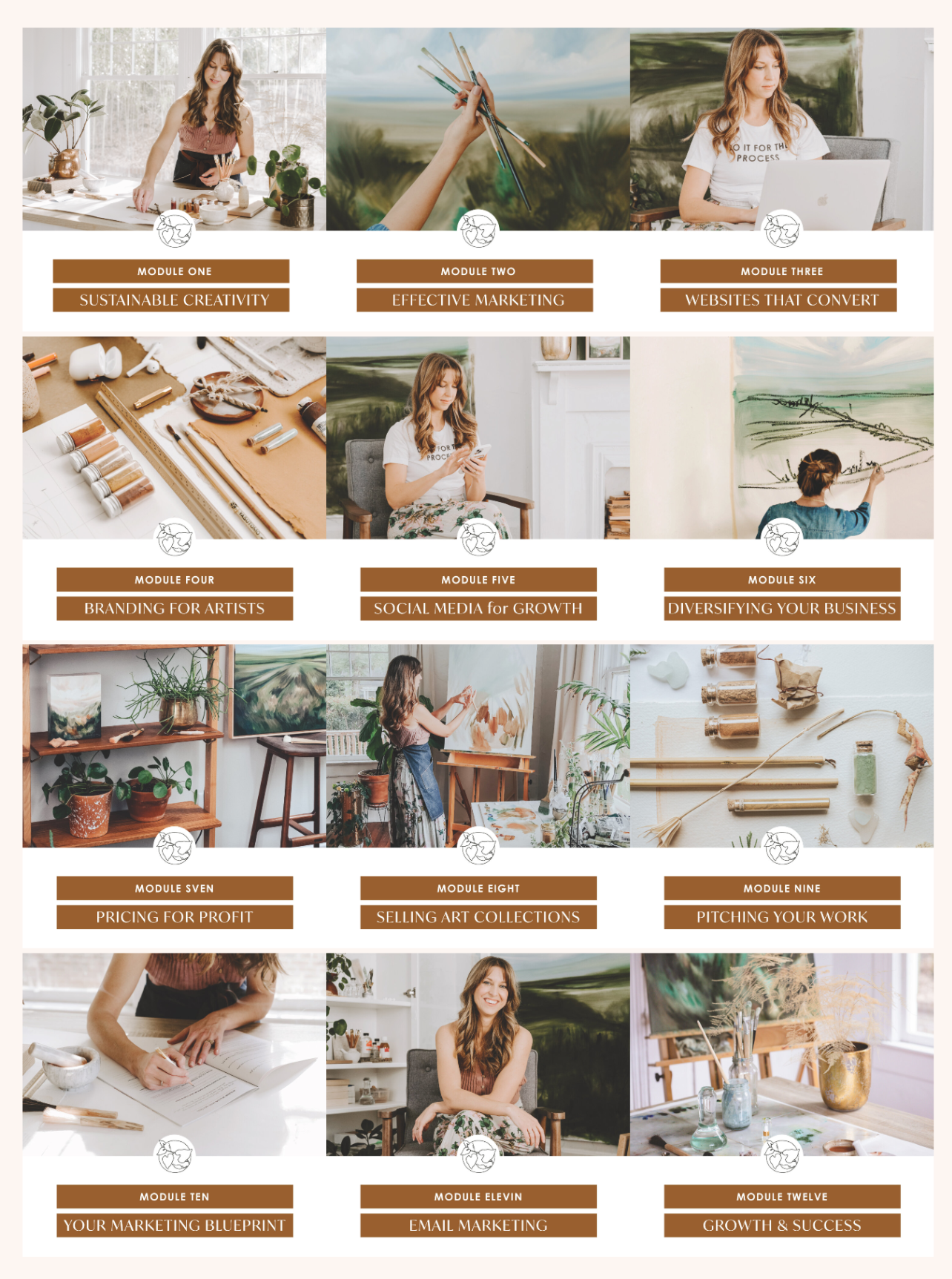
A glimpse at what the Making Art Work modules were in 2021. The mix of basic & advanced marketing techniques sold me on this class.  I needed a refresher, as well as guidance for how to evolve!

Thursday, July 16, 2020

Kickstarter Post-Mortem: Birthstone Goddesses Coloring Book

Cross-posted from my Patreon blog and re-shared here for your convenience!
I wrote a rather extensive post on Facebook back in 2018 about my experience with my Birthstone Goddesses coloring book Kickstarter as an artist with a small following. I am finally re-posting it here so it is more accessible to all! (This project was known as the Ladies of the Months back then. Ah, title regrets!)
Book Kickstarters are a LOT of work and this post summarizes the life cycle of how this campaign operated with bonus pointers at the end as to why my first Kickstarter for the Birthstone Goddesses failed. You'll also find a compilation of links to my ads, landing pages, etc. at the end for further study.  
May this prove useful for any of you hoping to run your own Kickstarters in the future!  SHOUT OUT to the Make Your Art Work folks whose Kick Start Art Intensive with Stephanie Law prepared me for the Kickstarter journey that helped me make this campaign a success!

PROJECT STATS


  • My Project Link
  • My Project's Goal: $8k
  • Campaign Length: 30 Days
  • Hype Time: 2 months
  • Ad Budget: $200
  • All Stretch Goals Met - Ending Total - $9.4k
I started out with a somewhat small audience (approx. 250 on my mailing list at the time).

Sunday, April 14, 2019

Review - Printful for Artists


As an artist running a business with just one employee (aka. myself) and not a lot of storage space, I'm always looking for time-saving and space-saving measures so that I can focus more on art and less on other tasks that take time away from creating.  I'm at a unique position in my business' growth where I don't have a huge amount of print sales, but the few that I do get are enough to take up a good chunk of the morning to prep, package, and send out on my own.

This made Printful a good choice for me to look into until I feel comfortable expanding to printing art on my own professional printer at home and hiring more employees.  I have been using it for a little over a year and wanted to share my experience with it for those who may find themselves in a similar position as myself!

What is Printful?


Printful is a print on demand service that will drop ship directly to your customers on your behalf. This service seamlessly integrates with Etsy, WooCommerce, Shopify, and most major shop options. They take a cut of the profits and handle the printing and shipping.

They will also process returns on your behalf with you acting as an intermediary for your customers. Printful fulfills orders mainly to the US, but they have been slowly adding fulfillment centers in Europe so that they can quickly deliver items overseas.

Printful is a completely white label service, which means they will never include any of their branding within your orders. If for some reason you do not want them to integrate with your shop, you can also place orders with them to drop ship manually for you without requiring shop integration.


What Does it Cost?

Like most print on demand companies, there is no monthly fee, rather they only make money when you sell a product.  There is a base price for the cost of the item and labor, and a percentage on top of this base price which the company takes a share of.

You can set your own list price per item in your shop to suit the profit margin you want to see with each item.  Printful has a handy estimation tool so you can see exactly how much you'll make per item when you set your list price.

How is the Quality?

I have used Printful primarily to purchase luster prints, so I cannot speak to the quality of their many other products.  As far as print surfaces, they offer matte, luster, and canvas prints.

I chose their luster prints because I prefer a semi-gloss finish for my art.  Their luster prints are gorgeous and provide excellent color reproduction for some of my most difficult prints, such as dark digital pieces with subtle color like the one pictured below.

My Kushiel's Dart print arrived rolled in tissue paper inside of a mailing tube.
An example of the branding included on the outside of the package and the tightly wrapped print.

An example of the branded pack-in slip that's included for free with orders.

Saturday, September 2, 2017

Social Media for Artists 101 & 102 (v2)

Thanks to the folks who turned out for my panels about social media basics for artists at DragonCon 2017!  Here are the PowerPoint presentation for your convenience!


You can watch the previous version of this presentation here!  I'll be posting past versions of the presentation as reference so we can point and laugh at these old presentations, as well as study how trends have changed over time (which helps with predicting future trends).

Questions? Comments?  Feel free to leave them in the comments so we can continue the discussion from the panels!

Wednesday, August 24, 2016

Post Tags in Beta on Patreon

Good news for Patreon users!  The ability to tag posts with topics is in beta to a small percentage of users on Patreon!  These post tags will allow users to organize their posts by unique tags, which will make things like finding Rewards and referencing older posts much easier.

You can read more about this new feature here.  But the long of the short of it in beta phase is this:

  • Maximum amount of 5 tags allowed per post.
  • Tags will sort your user posts only and don't apply to other user's posts.
  • Some tags will be auto-generated for you, mainly your Reward tier tags by Pledge amount and Public/Private posts.  (See the screenshots below)
  • Patron-Only posts are blank when displayed in tag feeds where a user is not a Patron. (See the screenshots below)
  • No way to tag multiple posts at once.

Here's how the tags currently look on my art Patreon. The archive of all tags used shows up on the left. You currently cannot toggle this archive list on and off:


Here's how Patrons-only posts look to non-Patrons:


I'm personally planning to set up a Library section in the top of my bio/intro post that will link to my main Rewards and other topics, such as my finished paintings and main projects.  This would make things so much easier to find for new Patrons who might be overwhelmed by the stream of posts.

EDIT: I've tweaked my intro section to test out the new functionality of tags. See the tags in action here!

The highlighted sections of these screenshots show hyperlinks which link to tagged posts.


How do you plan to use the tags?  Share in comments!


Friday, June 24, 2016

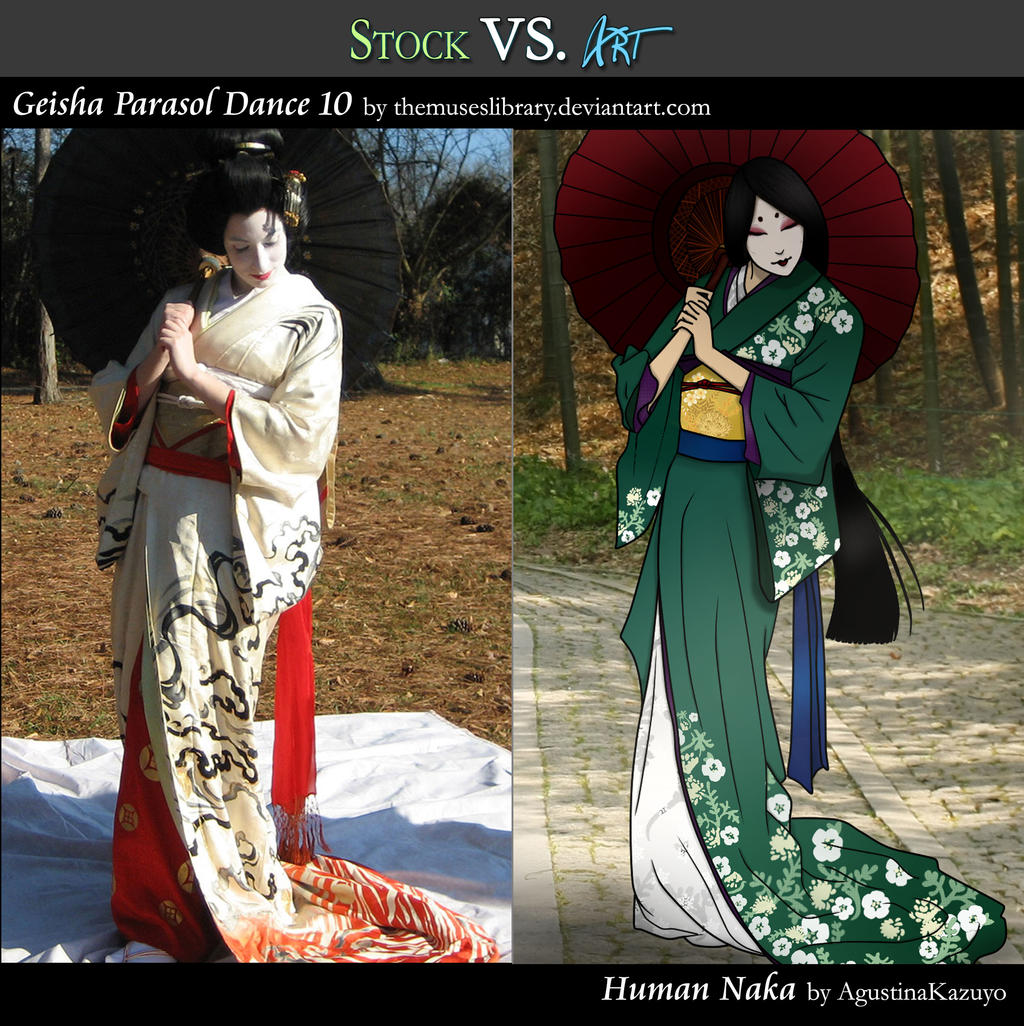
Stock VS Art: Human Naka


I've missed a couple of months of these features, but I'm back again with this lovely art!

Wednesday, April 6, 2016

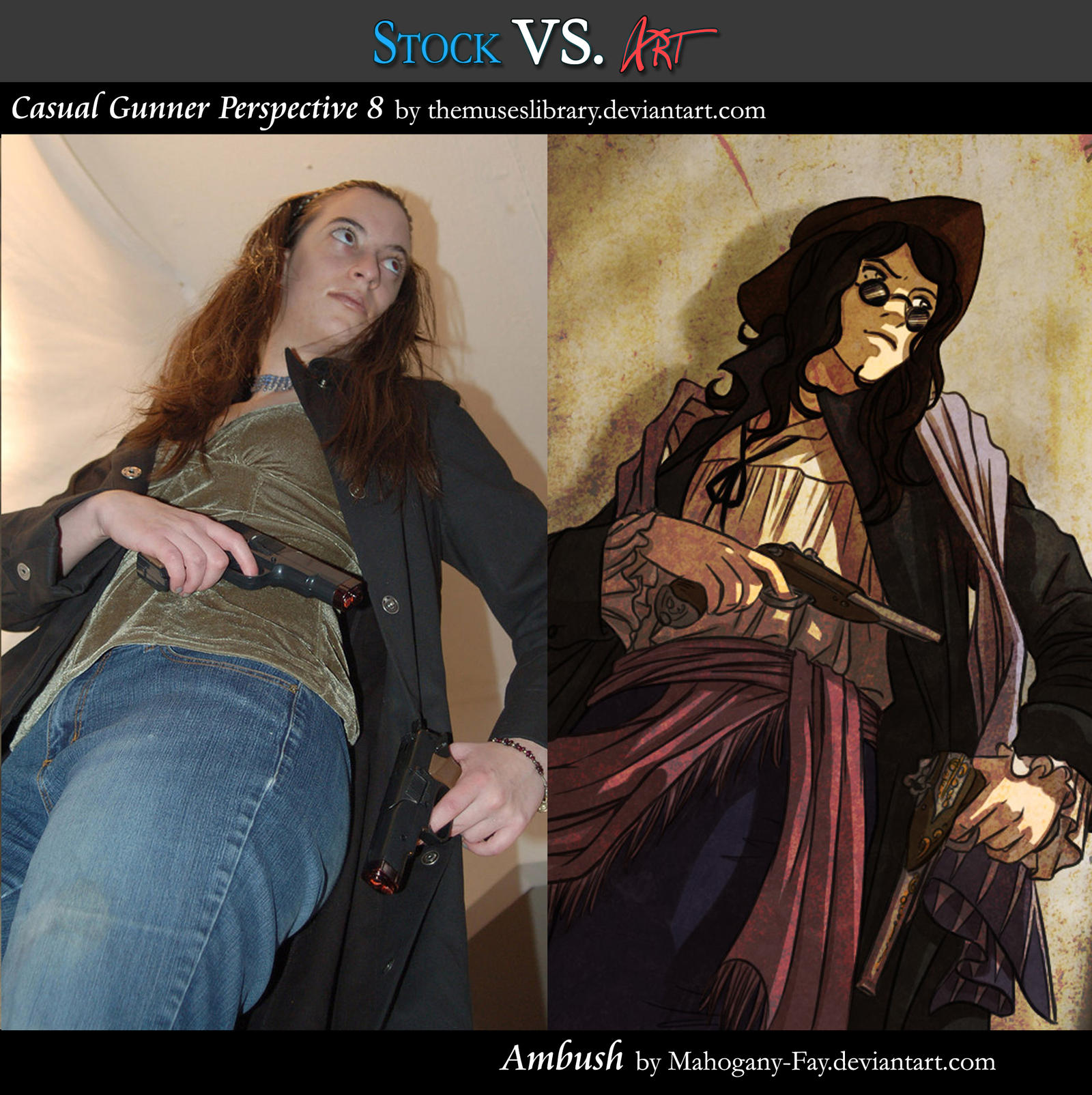
Stock VS Art Feature: Ambush


It's that time of month again! Every month, I want to feature the creative works people have done using my stock.

This month we have a lovely piece by Mahogany-Fay where I got to live out my gunslinging pirate-esque fantasy in someone's work!

Funny enough, she somewhat resembles a tabletop character I RP these days. Talk about serendipity!

Thursday, February 18, 2016

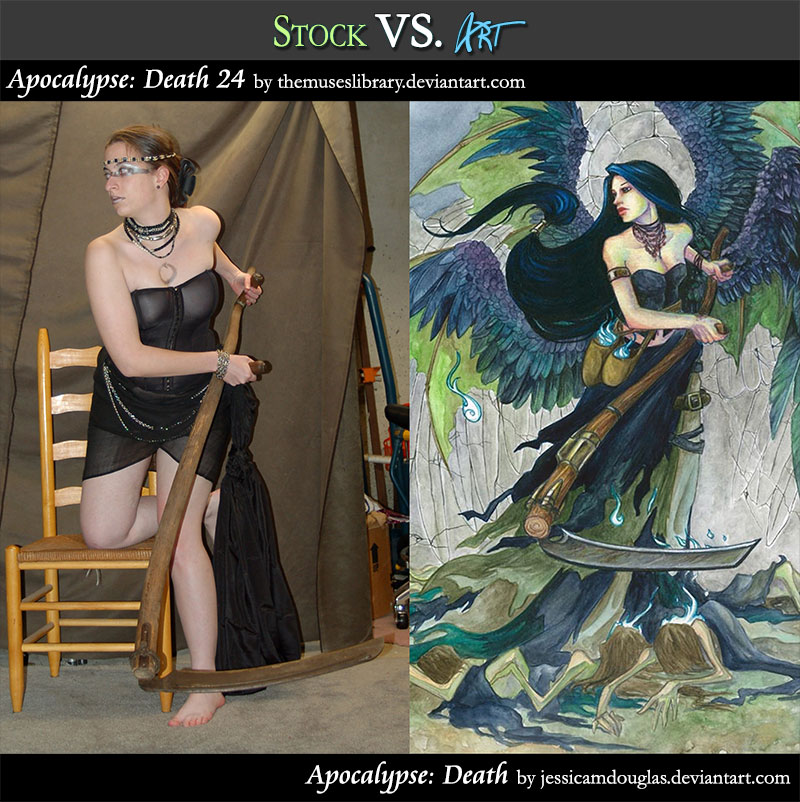
Stock VS Art Feature: Apocalypse Death

I thought it might be fun to start a tradition of Stock vs. Art features starring some of my favorite work you creative folks have made using my stock! Maybe you'll discover some new art to inspire you as well. Enjoy!

Today I'm featuring the work of Jessica Douglas, her glorious Horseman(woman) of Death!


The Stock:


The Art:

Thursday, December 24, 2015

REFERENCE SET - Casual Gunner PACK


This is a stock reference photo resource available for FREE personal use or for commercial use for a minimal fee. Purchase high res and commercial use images at the links!

The image pack:
http://themuseslibrary.deviantart.com/art/Casual-Gunner-PACK-493999258

The single images:
http://themuseslibrary.deviantart.com/gallery/51809645/Casual-Gunner

See my full gallery of reference photos here: http://themuseslibrary.deviantart.com/

Alternatively, you can purchase my stock photo packs at my Gumroad shop where you can use Paypal instead of deviantART’s point system.

Monday, November 30, 2015

Patreon Project Kit for Artists


EDIT 2: As of 10/25/2017, Patreon has added Apps to help automate certain tasks, such as Patron-only posts for Wordpress and adding Patrons to your mailing list with Mailchimp. Check the apps out here! I'll post my thoughts on them after I've had a chance to experiment with them.

EDIT: Patreon has started a referral program! So if you'd like to give it a try, feel free to use my referral link - https://patreon.com/invite/gpvq


I'm a firm believer that crowd-funding is the wave of the future and the core building block of a growing breed of artist-entrepreneurs.  As soon as Patreon launched back in 2013, I knew they'd be something special for the creative community!  Through this format, people have been able to share more directly than ever before.

I thought I'd join in that spirit of giving by sharing the structure, templates, and other resources that keep my Patreon ticking!  I hope it helps other artists out there considering promoting their projects via this site.  Let's make a Patreon!

Release Schedule

When you set up your account, it's important to have an idea of how and when your releases will occur and also other notices you'd like to send to your Patrons so you can be aware of how much you might be spamming them at once so they don't get fatigued by your posts. Mine go something like this:

Last Day of the Month.  Patreon begins charging your Patrons on the 1st of the month, so let's start there!  The monthly image is uploaded before or on the last day of the month. I only release one painting per month to keep things simple, but you may want to release more frequently!

EDIT 11/20/2025: I eventually moved to charging once per month for any updates rather than Per Creation, as this way Patrons won't be surprised by any charges if I happened to be especially productive in any given month.  Patrons gave me feedback that this was easier for them to budget.

Within the First Week of the Month.  Rewards for all levels are posted in individual posts (one for each tier) and a PM is sent out regarding my Keyword Inspiration sketch (an event I hold monthly for $5+ Patrons where they turn in prompts and I draw the most inspiring prompt).  (You can also use Patreon's Shop area to host rewards, as you can make shop items free for individual tiers.)

The 15th of Every Month.  A mid-month reminder post reminding people to attend my monthly Studio Hangout (with a link to the Event on Google+), sharing a WiP of that month's art, and any other important reminders that might be relevant. The 15th is also my internal deadline to have the physical Rewards mailed out. (EDIT: I have since moved to letting Patreon Merch fulfill on my behalf and this has made my life easier! Very much worth the extra cost of the program.)

- Last Wednesday of Every Month.  A link to the recording of my live Studio Hangout is posted to Patreon.  The recording is auto-generated by Hangouts and posted to YouTube for me, which makes things easy.

(EDIT 11/20/2025: Lately, I use Twitch to broadcast hangouts and take recordings with Streamlabs.)

Digital File Rewards


Digital Rewards are the cornerstone of any Patreon since they're easy to fulfill and require less of an expense on the artist's part. Here are a few ideas for distributing digital items.

- EDIT 11/20/2025 Patreon's Shop.  Patreon natively hosts shop listings now which you can offer free to specific tiers, making it great storage for digital rewards.

- Patreon File Attachments. Now that Patreon supports post tags, Rewards are easy to find and autotagged by the cost of the Rewards level without you needing to lift a finger.  You could also create tags with custom Rewards names, if you've personalized your tier titles.  Be aware that a single post can support unlimited attachments as long as each attachment is not larger than 200MB.

- Gumroad.  Gumroad is a free online shop service that allows a user to create shop listings and host digital files of up to 16GB per attachment.  They allow users to create private listings, which is perfect for sharing Patreon exclusive files.  You can also share files that would usually cost money by creating a special offer code and sharing links where the code is auto-applied to your listing only with your Patreon Patrons.  Best of all, Gumroad takes care of the file hosting and link management for your Patrons!  You can find out more about using Gumroad the way that I am suggesting here and here (the 2nd method discussed on the help entry about creating an offer to make a product free is the one I'm referring to).

- DeviantART's Sta.sh. DA's sta.sh allows for private viewing of file links for anonymous viewers who have the url. You can store any kind of file (image, video, etc.) and also 'stack' them if you have multiple releases you'd like to show at a single url. The current default limit for free users of DA is 2GB while Premium members get 10GB. Another random perk is that you can also hotlink to sta.sh files if you are embedding images into html on other sites.

- YouTube. YouTube allows you to upload videos at private links (called 'unlisted videos') that are only accessible to those who have the link.  It's a good alternative if you want to offer a streaming option for videos instead of requiring a complete download of the entire file.

Private Journal Entries


Sharing exclusive posts can really make Patrons feel special! However, Patreon's current journal function is very limited and doesn't allow images and text to be formatted easily. For this reason, here are some suggestions for ways to share private journals:

WP Hide Post. If you run a site built with Wordpress, the WP Hide Post plugin allows you to completely hide a post from search engines, your website's categorization, etc. so that you can essentially host a private post on your server that you can link people to.  Only those with the direct link can see it or find it.

- DeviantART's Sta.sh. While also useful for storing files, you can also use Sta.sh Writer to create more robust journal entries than Patreon currently does that can be linked to directly, but not accessed publicly. These private journals also allow DeviantART users to comment on them.

- EDIT: 5/17/2023 Patreon's Wordpress Plugin.  This plugin for Wordpress will let you lock posts behind a paywall organized by your Patreon's tiers on your Wordpress site so that you can encourage promotion natively from your own website.  You can see this in action on my website here.

Physical Rewards


- Postcard and Greeting Card Mailings. I use www.postable.com for a fast, secure, and easy solution for mailing out postcards (ie. Christmas cards, Thank You cards, etc.) to my Patrons. You can personalize your cards online, though they will not be handwritten.

- Prints. I usually print off my own prints via an Epson Artisan 1430 which boasts lightfast inks and wide format printing (up to 13x19 inches), but when I need bigger and/or fancier prints (ie. giclee, canvas, mounted prints, etc.), I turn to www.iprintfromhome.com (tell them Angela Sasser sent you and we both get Thank You dollars when you make your first order!).

- EDIT: 5/17/2023 Patreon Merch.  I've recently joined the Merch program to test it out and I'm very excited!  I know the quality will be good, as they have integrated with Printful, which I already use in my shop for drop-shipping.  This program promises to save me time by managing all my merch packaging, delivery, and loyalty tracking needs.  Once I have tried this program for awhile, I'll be sure to share a full review here.

Reader Suggestions

Before I get to the Templates, I'd love to hear your reader suggestions in comments!
If you have any tips or resources you'd like to add that I find particularly helpful,
I'll add your tip to this journal entry with a link to your Patreon page.
Let's make this entry a great resource for the community!

Templates

Patreon has an official set of logos, wordmarks, and swatches you can find here!  They have specific rules of how they prefer their logos to be used, so it's definitely worth checking out this page.

Friday, November 20, 2015

REFERENCE SET - Origami Butterflies PACK


This is a stock reference photo resource available for FREE personal use or for commercial use for a minimal fee. Purchase high res and commercial use images at the links!

I hand folded all 48 butterflies for a painting of mine. Hopefully my efforts prove useful to someone else out there!

The image pack:
http://themuseslibrary.deviantart.com/art/Origami-Butterflies-PACK-449964133

The single images:
http://themuseslibrary.deviantart.com/gallery/49231025/Origami-Butterflies

See my full gallery of reference photos here: http://themuseslibrary.deviantart.com/

Alternatively, you can purchase my stock photo packs at my Gumroad shop where you can use Paypal instead of deviantART’s point system.

Monday, October 19, 2015

1st IMPRESSION: Surface 4 Pro and Surface Book for Artists

This past weekend, I was able to check out the new Surface Pro 4 and Surface Book while visiting the Microsoft store here in town.  Ever since I sold my small, barely portable Cintiq 12WX, I've been on the lookout for a portable solution for me to use when I want to work on digital art out of the studio.  I never could get used to the art apps on the iPad or find a stylus for it that I liked.

Starting Specs

To start off with, both the Surface and the Book have pretty nice starting specs which I know will run Photoshop smoothly.  The processors are even better than the previous models!  Though I'm still undecided if I need the hot keys that the Cintiq device would provide.  The sliders and hotkeys on the Cintiq are useful for quickly zooming in and changing brush size, but are they worth the extra expense?

Subtle Improvements

The Surface Pro 4 seems a nice improvement on the previous model in subtle ways, as it now has a much improved stylus with a purported 1024 levels of pressure sensitivity as well as an eraser that actually erases, which it didn't have in previous models.  The representative also told me that the stylus comes with interchangeable nibs by default so you can change the resistance of the stylus if you want.  The Freshpaint program that comes with both the Book and Surface also seems to work very similarly to Corel Painter, which was a surprise!

Differences Between the Book and Surface

The Surface Book is much like the Surface, except that the Book's screen is a couple inches bigger and has a hardier keyboard, though I felt that both keyboards were comfortable and could probably replace my laptop as far as typing if I actually wanted to use either one to write while I'm out as well.  The Book, like the Surface, also disconnects from the keyboard to become a standalone tablet.

Extra Stuff

The Surface has one USB 3.0, a micro SD slot, and a mini displayport, while the Book has two USB 3.0 ports, a full sized SD card slot, and a mini displayport.  These will be handy for plugging up extra hd's or devices.

Price

The Pro starts at $899 while the Book starts at $1,499 (with the Cintiq Companion being $2,499 by comparison).

I'm hoping to save up and get the Book if I can, but I may end up settling for the Surface.  Either way, I'll be sure to come back with a full review once I've had time to completely settle in with either of these devices!

Tuesday, September 8, 2015

Social Media 101 and 102 DragonCon 2015 Panels


Hey, all!  Thanks to those of you who attended my panels for artists at DragonCon this year.  It was the first time I've given my 102 panel and you all were a great crowd!  As promised, I've uploaded the Powerpoint files for my presentations for you to peruse.

Social Media 101 - Download
Social Media 102 - Download

I've made a few small additions made on suggestions from the audience and my own afterthoughts.  Once I've had a chance to recuperate from the convention a little more, I'll be uploading an expanded version of this presentation with an audio element and more explanation of the topics.

Thanks again for a great con!  Welcome, new readers, to the Muse's Library.  I hope you find inspiration and knowledge here!

Wednesday, September 2, 2015

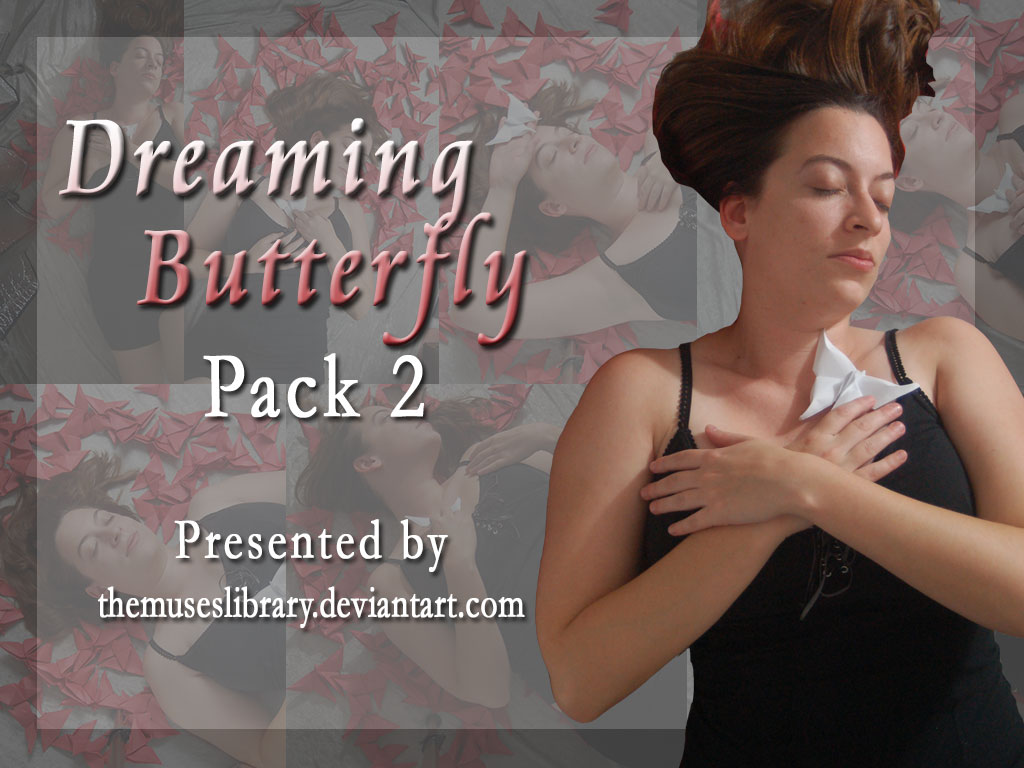
REFERENCE SET - Dreaming Butterfly PACK 2


This is a stock reference photo resource available for FREE personal use or for commercial use for a minimal fee. Purchase high res and commercial use images at the links!

The image pack:
http://themuseslibrary.deviantart.com/art/Dreaming-Butterfly-Pack-2-451315204

The single images:
http://angelasasser-stock.deviantart.com/gallery/49296321

See my full gallery of reference photos here:
http://themuseslibrary.deviantart.com/

Alternatively, you can purchase my stock photo packs at my Gumroad shop where you can use Paypal instead of deviantART's point system:
www.gumroad.com/themuseslibrary

Want to help me keep creating resources for artists? Donate over at my Patreon page!
http://www.patreon.com/themuseslibrary

Thursday, July 23, 2015

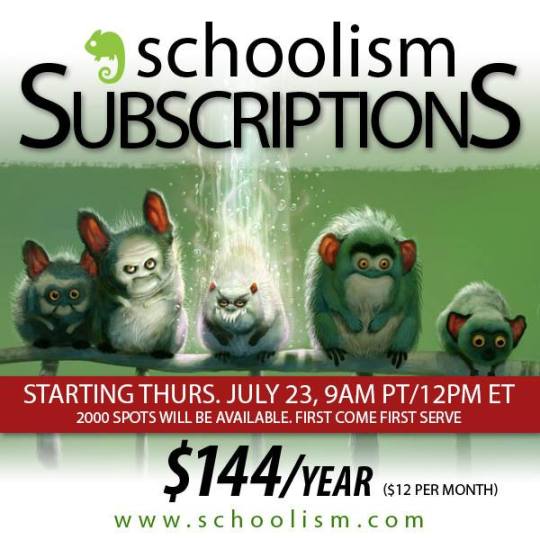
Schoolism Opening Up Subscriptions to More Users

Schoolism is letting more users into their new subscription program! Get access to great art courses on the cheap.  I know I can’t wait to start Pictoral Composition and Color and Light in September!

Wednesday, July 15, 2015

REFERENCE SET - Dreaming Butterfly PACK 1


This is a stock reference photo resource available for FREE personal use or for commercial use for a minimal fee. Purchase high res and commercial use images at the links!

The image pack:
http://themuseslibrary.deviantart.com/art/Dreaming-Butterfly-Pack-1-451314606

The single images:
http://angelasasser-stock.deviantart.com/gallery/49296321

See my full gallery of reference photos here:
http://themuseslibrary.deviantart.com/

Alternatively, you can purchase my stock photo packs at my Gumroad shop where you can use Paypal instead of deviantART's point system:
www.gumroad.com/themuseslibrary

Want to help me keep creating resources for artists? Donate over at my Patreon page!
http://www.patreon.com/themuseslibrary

Thursday, July 2, 2015

Pros & Cons: Etsy vs. Storenvy


A few years back, I wrote a comparison of eBay vs Etsy and the pros and cons of both (plus a review of eBay's shop format).  Now, the marketplace has another contender that's definitely worth noting for independent artists - Storenvy.  Time to re-evaluate!

Note: I've left eBay off this list because I don't use it actively anymore and never found it very effective for me as an artist beyond occasionally auctioning off originals using the free monthly auction style listings.  It also hasn't changed much since my last review, except for allowing a higher amount of free auction style listings per month for sellers.  If you have collectible work related to fandoms or people actively seeking to collect your work, eBay might be a good fit for you.  As I have neither of those things in large capacity yet, I find these other marketplaces more suiting for emerging artists.


Etsy - The Handmade Marketplace

Etsy is one of my favorite marketplaces because their whole community encourages people to invest in independent artists (unlike eBay which generally has a flea market mentality).  Etsy is constantly adding forward-thinking features to make the selling experience smooth and efficient.

PROS

Cheap Listing Fees - 20 cents nets you a single item listing on their marketplace, which is low cost, all things considered. You can also claim 40 free listings by using my referral link if you want to try Etsy out with no strings attached.  Even if you already have a username, you can still claim the free listing referral credits if you haven't listed an item for sale before.

- Direct Checkout - Etsy allows a variety of payment methods, including Paypal.  They also allow a user to pay via credit cards through their integrated direct checkout feature so a customer never has to leave the site to checkout.

- Widgets - Etsy allows you to embed your items into your blog or websites, which is handy if you'd rather keep people on your site to browse your items.  They will have to go offsite to the Etsy marketplace if they want to make a purchase, however.

- Pay Per Click Ads - This is a vast improvement over their old Showcase system!  Etsy now lets sellers promote their items in the search engine, where they get priority placement on the items sellers specifically choose to promote.  You only have to pay for ads if a customer clicks on your link, which is a vast improvement over paying a flat fee and means you get more bang for your buck.

- Free Credit Card Reader - As a seller, you can sign up to receive a free credit card swiper that allows you to take payments in person.  The best thing about this swiper is that it keeps track of your stock so if you sell an item from your shop at a show using the swiper, it subtracts from the stock listed in your Etsy shop, which allows for you to prevent the pesky problem of an item selling online while you're out of town.  For a more in-depth rundown of Etsy's reader, see my Etsy Reader review.

Calculated Shipping - While you can still set up shipping classes for flat fee shipping, Etsy now lets you integrate automatically calculated shipping via USPS, which can save you a lot of time and money after you do the setup, which can be a little annoying at first (you have to calculate wait and box sizes).  The initial headache is worth it, however, because it lets customers also choose expedited shipping speeds, which is not available if you use flat fee shipping (most people create an entire separate listing for a shipping upgrade).

Integrated Shipping Labels - You can print your shipping labels for orders directly within your admin panel.  Discounted rates are offered via USPS within this panel.

Integrated Coupon Codes - Handy for hosting sales, though they don't get more complex than free shipping or a certain percentage off of your item.  Many use Etsy on Sale to do more visible sales events in their Etsy shop.

Item Variations Allowed - You can create different size offerings with different price points within a single item, rather than having to create multiple items.  You can also create a two level deep variation, so you could have a selection of size AND color (or, for a more specific example, you could offer an art print with customizable Matting AND Print Size).

CONS

High Competition  - Etsy has really exploded as a presence with high market share now that it has gone public and had a few years to expand its reputation.  High competition means it's more difficult to get seen and almost necessary to pay for ads to boost your views.  Many also worry that because Etsy allows designers to outsource that the small sellers will be quickly overwhelmed by others who can afford to charge less for their items.  This seems to affect 2D artists less than it does those who create jewelry and other such items that can be replicated.

- Not Suited for Digital Sales - While you can sell digital items on Etsy, the file size limit is pretty low at 20MB which means you'll have to break up larger files into multi-part .zip files, but you can only have 5 total attached files, so this can be tricky. (EDIT: Try Gumroad for a digital item shop solution that has no listing fees. Gumroad takes a small commission from any sale.)

- Not Very Customizable - You get a header image, an avatar, and an About page that you can somewhat customize.  Otherwise, you are stuck with Etsy's very orange branding.

Storenvy


Storenvy is a newer online marketplace so it doesn't have the market share of eBay or Etsy yet, but that may change if they can keep their marketplace afloat!  What it does have over the others, however, is a clever setup in which sellers can open a shop for free.  A seller gets a private custom shop which they can then choose to display on their public online marketplace.  Storenvy makes their money from a commission they take out of sales made via the public marketplace and the many add-ons they offer to extend your base shop's functionality.  Unlike Etsy, it does not cater just to handmade markets, but allows mass produced items as well.

PROS

No Listing Fees - Yup, completely free and unlimited amount of listings allowed!

Customizable Storefront - You get access to CSS templates and the ability to create custom html pages.

Coupon Codes - Same as Etsy in that you can create simple percentage discounts (but no free shipping coupon codes).  You would need to purchase an add-on service in order to create free shipping offers and other specialized coupons (ie. buy one, get one free, etc.)

Item Variations Allowed - You can create different size offerings with different price points within a single item, rather than having to create multiple items.  However, unlike Etsy, variations are not very deep and only allow you to customize one level of options.

CONS

Low Traffic - Compared to Etsy, the traffic I've gotten from within and outside of Storenvy has been very minimal and I've had a shop on Storenvy for a couple of years now.  It's worth noting, however, that they've only recently rolled out their public marketplace, which means this traffic may go up as they expand their functionality and reputation.

No Integrated Shipping - You have to buy an add-on with a monthly subscription fee in order to create shipping labels.  Otherwise, you're in charge of creating your own labels with your preferred service.

No Digital Sales - You have to purchase an add-on with a monthly subscription fee in order to host digital files on your Storenvy shop.

No Paypal - Currently, Storenvy uses Stripe exclusively EDIT: It seems I missed that the public marketplace shops do not allow Paypal, but the custom shops DO!  Thanks Roma over at AANI for the correction.

No Widgets - As far as I have discovered, there's no way to embed items from Storenvy into a blog or website. There is a paid add-on that lets you build a catalog you can share online, but it requires a subscription fee.

FINAL THOUGHTS
I actually use both of these marketplaces.  I generally use Etsy to host my small originals, limited edition prints, and other things that have a special element to them, which seems to suit their gift and wedding focused marketplace.  Greeting cards and other items that have an additional use also do well on this market.  My handmade masks and jewelry do the best out of any of my items, making it
especially suited for those artists who create wearable art.

(Shameless plug! If you'd like to have 40 free listing credits to try Etsy, feel free to use my referral link! You help me by earning me 40 free listing credits too when you list your first item for sale. This referral link works even if you already have a username, but haven't listed an item for sale yet.)

As for Storenvy, I use it for my Angelic Shades shop because the high dollar original paintings don't sell very often on Etsy and I'd rather not have to pay a constant relisting fee on them.  Storenvy is a great option if you have slower moving items, have a low budget, and don't require any deep features to your selling experience.

Don't be afraid to test different markets and see what works for you!  Both Etsy and Storenvy cater to different audiences, but also provide a stable place to host your shop, which is a great option for beginners to start before they move on to investing in a self-hosted shop.

More on the topic of self-hosted shops in a future article!  Till then, happy selling!

Did I leave anything out?  Let me know in comments!

Wednesday, June 17, 2015

REFERENCE SET - Asian Butterfly Box PACK


This is a stock reference photo resource available for FREE personal use or for commercial use for a minimal fee. Purchase high res and commercial use images at the links!

The image pack:

The single images:

See my full gallery of reference photos here:

Want to help me keep creating resources for artists? Donate over at my Patreon page!

Wednesday, May 20, 2015

REFERENCE SET - Seated Nouveau Lady PACK 2


More Art Nouveau themed stock for your classical portraits!

This is a stock reference photo resource available for FREE personal use or for commercial use for a minimal fee. Download the personal-use photos or purchase high res and commercial-use images at the links!

The image pack: 
http://themuseslibrary.deviantart.com/art/Seated-Nouveau-Lady-PACK-2-460930651

The single images: 

See my full gallery of reference photos here: 

Want to help me keep creating resources for artists? Donate over at my Patreon page!